---
title: "Keyboard hacking seems like fun"
date: 2016-02-06T12:00:00-07:00
url: https://blog.lmorchard.com/2016/02/06/keyboard-hacking/
author: Les Orchard
tags: [diy, keyboards, hardware, teensy, microcontrollers, electronics]
---
# Keyboard hacking seems like fun
**TL;DR**: I think I've caught the DIY keyboard hacking bug, and I'll probably
end up building something weird.
I love tinkering and I love keyboards. But, I'd never really tinkered with my
keyboards - at least, not beyond [disassembling & cleaning them][hhkbclean].
I'd seen a smattering of crowdfunded projects over the years like the
[ErgoDox][] and [Keyboardio][]. But, those seemed like complex design
& manufacturing efforts - not like, you know, something I'd do for fun.
But then, last summer, I ran across [Massdrop][] and saw the [Infinity 60%
Keyboard Kit][infinity60]. From there, I ran across "[Introduction to Keyboard
Programming][kbprog]" and some rusty gears turned over in my brain. I
discovered [geekhack][] and [Deskthority][] and fell down a dangerous
rabbit hole of [switches][] and [caps][], [layouts][] and [plates][],
[microcontrollers][teensy] and [firmware][].
Turns out there are a bunch of folks doing this stuff as a hobby, along with a
niche industry to support it.
After a few months of absorbing information and spectating on projects in
forums, it occurred to me that this did in fact seem like something I'd have
fun doing. But, rather than just dive in, I decided to start small:
[kits]: http://www.geekhackers.org/products/jd40-jdcarpe-s-40-keyboard-kit-sorbothane-titanium-all-profits-go-to-the-nathan-j-walters-foundation-rip-smallfry
[firmware]: https://geekhack.org/index.php?topic=41989.0
[teensy]: https://www.pjrc.com/teensy/
[plates]: https://deskthority.net/workshop-f7/thkb-tiny-hacking-keyboard-40-t6455.html
[layouts]: https://geekhack.org/index.php?topic=47133
[caps]: https://geekhack.org/index.php?board=80.0
[switches]: https://www.massdrop.com/buy/cherry-mx-red-key-switches-120-pack
[Deskthority]: https://deskthority.net/
[geekhack]: https://geekhack.org/
[infinity60]: https://www.massdrop.com/buy/infinity-keyboard-kit
[keyboardio]: http://shop.keyboard.io/
[ergodox]: https://www.indiegogo.com/projects/ergodox-ez-an-incredible-mechanical-keyboard#/
[key64]: http://www.key64.org/
[hhkbclean]: http://blog.lmorchard.com/2006/07/31/i-heart-my-filthy-happy-hacking-keyboard/
[kbprog]: https://www.massdrop.com/article/introduction-to-keyboard-programming
[massdrop]: https://www.massdrop.com/
[ ](https://www.flickr.com/photos/deusx/24832952956/)
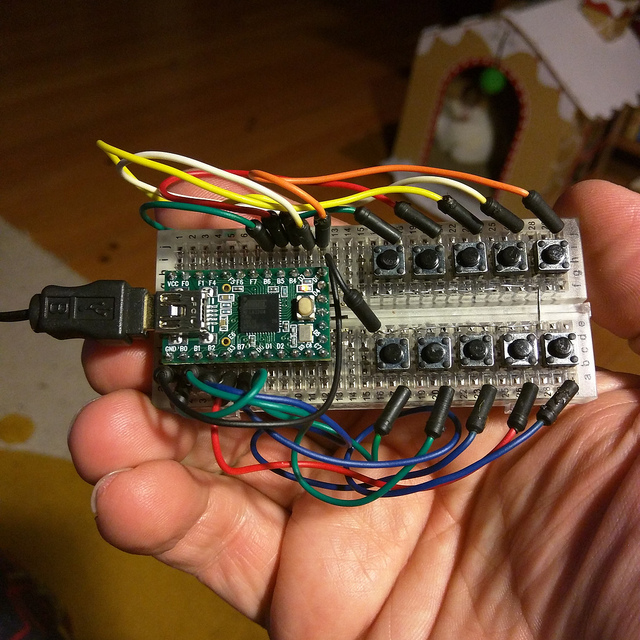
Last weekend, I ran to my local [Micro Center][] and picked up a [Teensy
2.0][teensy]. That seems to be the microcontroller board a lot of keyboard
projects have been using, so I figured getting acquainted with it would be
handy. After the traditional "hello world" project of [getting an LED to
blink][blinky], I wired up a pile of buttons on a breadboard and [built the
firmware to my first DIY USB keyboard][keyboardtut].
Okay, so it was just a tutorial and no special effort on my part. But, the
process was super easy, so the hacking possibilities started piling up in my
head.
Then, I discovered the [TMK keyboard firmware][firmware] on the
[geekhack][] forums. Basically, all the software work had been done for me.
The TMK firmware is a ready-made pile of code for translating from basically any
matrix of switches or wire protocol to USB HID keyboard codes - complete with
support for flexible key maps, mouse control, function-key layers, macros, and
a bunch of other things.
My little 10-key breadboard toy wasn't all that practical. But, I discovered
that the TMK firmware also supported building keyboard *converters*. Of
particular interest was the [PS/2 to USB keyboard converter][ps2usb], since I
just happen to have a pile of older PS/2 keyboards lying around doing nothing.
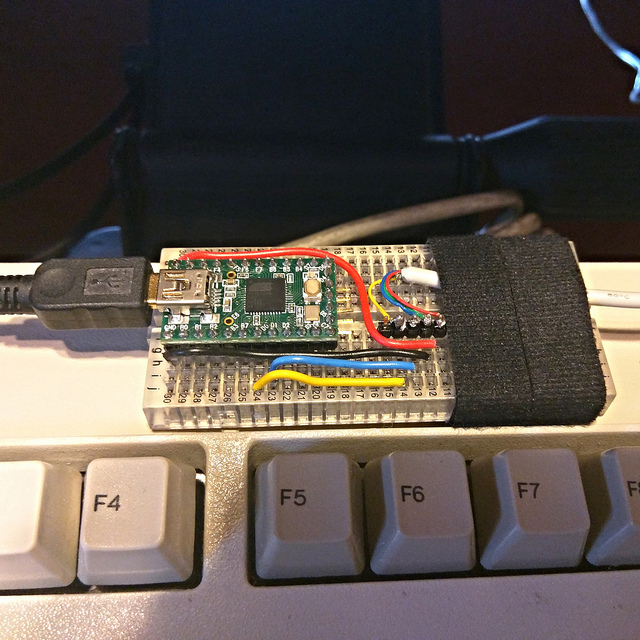
The converter only took 4 wires, so I sacrificed a PS/2 cable from the back of
a drawer and came up with this:
[ps2usb]: https://github.com/tmk/tmk_keyboard/blob/master/converter/ps2_usb/README.md
[keyboardtut]: https://www.pjrc.com/teensy/td_keyboard.html
[blinky]: https://www.pjrc.com/teensy/tutorial.html
[micro center]: http://www.microcenter.com/site/stores/madison-heights.aspx
[
](https://www.flickr.com/photos/deusx/24832952956/)
Last weekend, I ran to my local [Micro Center][] and picked up a [Teensy
2.0][teensy]. That seems to be the microcontroller board a lot of keyboard
projects have been using, so I figured getting acquainted with it would be
handy. After the traditional "hello world" project of [getting an LED to
blink][blinky], I wired up a pile of buttons on a breadboard and [built the
firmware to my first DIY USB keyboard][keyboardtut].
Okay, so it was just a tutorial and no special effort on my part. But, the
process was super easy, so the hacking possibilities started piling up in my
head.
Then, I discovered the [TMK keyboard firmware][firmware] on the
[geekhack][] forums. Basically, all the software work had been done for me.
The TMK firmware is a ready-made pile of code for translating from basically any
matrix of switches or wire protocol to USB HID keyboard codes - complete with
support for flexible key maps, mouse control, function-key layers, macros, and
a bunch of other things.
My little 10-key breadboard toy wasn't all that practical. But, I discovered
that the TMK firmware also supported building keyboard *converters*. Of
particular interest was the [PS/2 to USB keyboard converter][ps2usb], since I
just happen to have a pile of older PS/2 keyboards lying around doing nothing.
The converter only took 4 wires, so I sacrificed a PS/2 cable from the back of
a drawer and came up with this:
[ps2usb]: https://github.com/tmk/tmk_keyboard/blob/master/converter/ps2_usb/README.md
[keyboardtut]: https://www.pjrc.com/teensy/td_keyboard.html
[blinky]: https://www.pjrc.com/teensy/tutorial.html
[micro center]: http://www.microcenter.com/site/stores/madison-heights.aspx
[ ](https://www.flickr.com/photos/deusx/24832952956/)
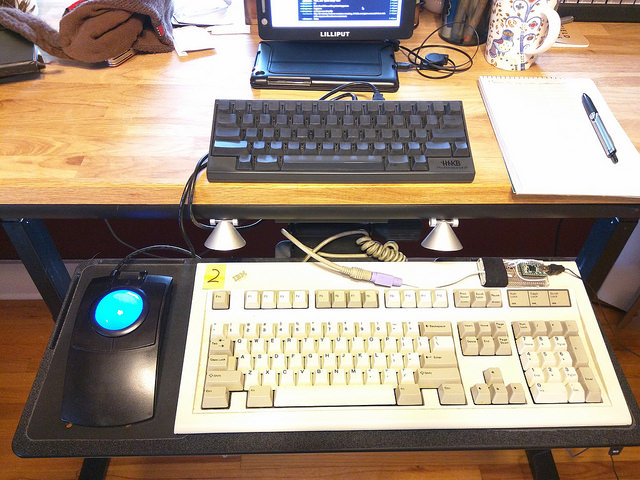
Coincidentally, the day after I built this, I got some IBM Model M keyboards
from [a friend][nuxx] of mine. I've been wanting to fill my office with the
sound of buckling springs for awhile, now.
[nuxx]: https://nuxx.net/blog/
[
](https://www.flickr.com/photos/deusx/24832952956/)
Coincidentally, the day after I built this, I got some IBM Model M keyboards
from [a friend][nuxx] of mine. I've been wanting to fill my office with the
sound of buckling springs for awhile, now.
[nuxx]: https://nuxx.net/blog/
[ ](https://www.flickr.com/photos/deusx/24685464831/)
This is all hooked up to a modern MacBook Pro, but the IBM Model M is
decidedly lacking in [Command (⌘) keys][command]. So, the DIY converter
proved its worth immediately.
I put together [my own simple keymap][lmotmk] and spent a day with it,
tweaking as I went. I set up [a file watcher][kicker] to rebuild the
firmware whenever I changed the source. Along with that, the [Teensy
Loader][loader] has an "auto" mode which reprograms the Teensy whenever I hit
the reset button.
At this point, I've replaced the Caps Lock key with Control and changed Alt keys
to Command keys. Then, I turned the Print Screen / Caps Lock / Pause trio
into volume control keys. After that, F10, F11, and F12 were pressed into
service as previous, next, & pause buttons for music. It was all a bit fiddly,
but it's the kind of thing I enjoy.
Overall, this all feels like a nice intro into a new hobby. Next, I'm
considering [replacing the IBM Model M keyboard controller][ibmcontrol]
altogether, which will embed the Teensy right in the case.
After that, I'm tempted to turn my screwdriver on that other keyboard on my
desk - the Happy Hacking Keyboard Professional. There's a [Teensy-based
alternative controller][hhkbalt] option for it, also using the TMK firmware.
Once I feel comfortable with all that, it might be time to build something of
my own! [I've got a 75-key layout I'm mulling over.][nfhkb] If I end up liking
that, I can get a case & mounting plate [designed][platebuilder] &
[fabricated][ponoko]. Then, I can buy all the [switches][switches] and
[diodes][]. And last, but not least, I'll have to design a circuit board &
[get that fabricated][oshpark].
Or, if I really want to go for that handcrafted artisan experience - which I
just might, because I'm a glutton for punishment - I've got something like
this in my future:
[oshpark]: https://oshpark.com/
[diodes]: http://amzn.to/1UUHUu8
[ponoko]: https://www.ponoko.com/
[platebuilder]: http://builder.swillkb.com/
[hhkbalt]: https://geekhack.org/index.php?topic=12047.0
[ibmcontrol]: https://github.com/antonizoon/archivis.me/wiki/IBM-Model-M-USB-Controller
[kicker]: https://github.com/alloy/kicker
[loader]: https://www.pjrc.com/teensy/loader.html
[lmotmk]: https://github.com/lmorchard/tmk_keyboard/blob/lmo-model-mac/converter/ps2_usb/keymap_modelmac.c
[command]: https://en.wikipedia.org/wiki/Command_key
[nfhkb]: http://www.keyboard-layout-editor.com/##@_name=noisy%20fat%20hacker%20keyboard&author=lmorchard&switchMount=cherry&switchBrand=cherry&plate:true%3B&@=Esc&=!%0A1&=%2F@%0A2&=%23%0A3&=$%0A4&=%25%0A5&=^%0A6&=%2F&%0A7&=*%0A8&=%28%0A9&=%29%0A0&=%2F_%0A-&=+%0A%2F=&=|%0A\&=~%0A%60&_x:0.25%3B&=Insert&=Home&=PgUp%3B&@_w:1.5%3B&=Tab&=Q&=W&=E&=R&=T&=Y&=U&=I&=O&=P&={%0A[&=}%0A]&_a:0&w:1.5%3B&=Delete%0A%0A%0A%0ABS&_x:0.25&a:4%3B&=Delete&=End&=PgDn%3B&@_w:1.75%3B&=Control&=A&=S&=D&=F&=G&=H&=J&=K&=L&=%2F:%0A%2F%3B&=%22%0A%27&_w:2.25%3B&=Enter&_x:0.25%3B&=Op1&=Op2&=Op3%3B&@_w:2.25%3B&=Shift&=Z&=X&=C&=V&=B&=N&=M&=%3C%0A,&=%3E%0A.&=%3F%0A%2F%2F&_w:2.75%3B&=Shift&_x:1.25%3B&=%E2%86%91%3B&@_w:1.25%3B&=Fn&_w:1.25%3B&=%3Ci%20class%2F=%27mss%20mss-Unicode-Option-3%27%3E%3C%2F%2Fi%3E&_w:1.25%3B&=%3Ci%20class%2F=%27kb%20kb-logo-apple-outline%27%3E%3C%2F%2Fi%3E&_a:7&w:6.25%3B&=&_a:4&w:1.25%3B&=%3Ci%20class%2F=%27kb%20kb-logo-apple%27%3E%3C%2F%2Fi%3E&_w:1.25%3B&=%3Ci%20class%2F=%27mss%20mss-Unicode-Option-3%27%3E%3C%2F%2Fi%3E&_w:1.25%3B&=%3Ci%20class%2F=%27kb%20kb-Hamburger-Menu%27%3E%3C%2F%2Fi%3E&_w:1.25%3B&=Fn&_x:0.25%3B&=%E2%86%90&=%E2%86%93&=%E2%86%92
](https://www.flickr.com/photos/deusx/24685464831/)
This is all hooked up to a modern MacBook Pro, but the IBM Model M is
decidedly lacking in [Command (⌘) keys][command]. So, the DIY converter
proved its worth immediately.
I put together [my own simple keymap][lmotmk] and spent a day with it,
tweaking as I went. I set up [a file watcher][kicker] to rebuild the
firmware whenever I changed the source. Along with that, the [Teensy
Loader][loader] has an "auto" mode which reprograms the Teensy whenever I hit
the reset button.
At this point, I've replaced the Caps Lock key with Control and changed Alt keys
to Command keys. Then, I turned the Print Screen / Caps Lock / Pause trio
into volume control keys. After that, F10, F11, and F12 were pressed into
service as previous, next, & pause buttons for music. It was all a bit fiddly,
but it's the kind of thing I enjoy.
Overall, this all feels like a nice intro into a new hobby. Next, I'm
considering [replacing the IBM Model M keyboard controller][ibmcontrol]
altogether, which will embed the Teensy right in the case.
After that, I'm tempted to turn my screwdriver on that other keyboard on my
desk - the Happy Hacking Keyboard Professional. There's a [Teensy-based
alternative controller][hhkbalt] option for it, also using the TMK firmware.
Once I feel comfortable with all that, it might be time to build something of
my own! [I've got a 75-key layout I'm mulling over.][nfhkb] If I end up liking
that, I can get a case & mounting plate [designed][platebuilder] &
[fabricated][ponoko]. Then, I can buy all the [switches][switches] and
[diodes][]. And last, but not least, I'll have to design a circuit board &
[get that fabricated][oshpark].
Or, if I really want to go for that handcrafted artisan experience - which I
just might, because I'm a glutton for punishment - I've got something like
this in my future:
[oshpark]: https://oshpark.com/
[diodes]: http://amzn.to/1UUHUu8
[ponoko]: https://www.ponoko.com/
[platebuilder]: http://builder.swillkb.com/
[hhkbalt]: https://geekhack.org/index.php?topic=12047.0
[ibmcontrol]: https://github.com/antonizoon/archivis.me/wiki/IBM-Model-M-USB-Controller
[kicker]: https://github.com/alloy/kicker
[loader]: https://www.pjrc.com/teensy/loader.html
[lmotmk]: https://github.com/lmorchard/tmk_keyboard/blob/lmo-model-mac/converter/ps2_usb/keymap_modelmac.c
[command]: https://en.wikipedia.org/wiki/Command_key
[nfhkb]: http://www.keyboard-layout-editor.com/##@_name=noisy%20fat%20hacker%20keyboard&author=lmorchard&switchMount=cherry&switchBrand=cherry&plate:true%3B&@=Esc&=!%0A1&=%2F@%0A2&=%23%0A3&=$%0A4&=%25%0A5&=^%0A6&=%2F&%0A7&=*%0A8&=%28%0A9&=%29%0A0&=%2F_%0A-&=+%0A%2F=&=|%0A\&=~%0A%60&_x:0.25%3B&=Insert&=Home&=PgUp%3B&@_w:1.5%3B&=Tab&=Q&=W&=E&=R&=T&=Y&=U&=I&=O&=P&={%0A[&=}%0A]&_a:0&w:1.5%3B&=Delete%0A%0A%0A%0ABS&_x:0.25&a:4%3B&=Delete&=End&=PgDn%3B&@_w:1.75%3B&=Control&=A&=S&=D&=F&=G&=H&=J&=K&=L&=%2F:%0A%2F%3B&=%22%0A%27&_w:2.25%3B&=Enter&_x:0.25%3B&=Op1&=Op2&=Op3%3B&@_w:2.25%3B&=Shift&=Z&=X&=C&=V&=B&=N&=M&=%3C%0A,&=%3E%0A.&=%3F%0A%2F%2F&_w:2.75%3B&=Shift&_x:1.25%3B&=%E2%86%91%3B&@_w:1.25%3B&=Fn&_w:1.25%3B&=%3Ci%20class%2F=%27mss%20mss-Unicode-Option-3%27%3E%3C%2F%2Fi%3E&_w:1.25%3B&=%3Ci%20class%2F=%27kb%20kb-logo-apple-outline%27%3E%3C%2F%2Fi%3E&_a:7&w:6.25%3B&=&_a:4&w:1.25%3B&=%3Ci%20class%2F=%27kb%20kb-logo-apple%27%3E%3C%2F%2Fi%3E&_w:1.25%3B&=%3Ci%20class%2F=%27mss%20mss-Unicode-Option-3%27%3E%3C%2F%2Fi%3E&_w:1.25%3B&=%3Ci%20class%2F=%27kb%20kb-Hamburger-Menu%27%3E%3C%2F%2Fi%3E&_w:1.25%3B&=Fn&_x:0.25%3B&=%E2%86%90&=%E2%86%93&=%E2%86%92